
Tiger Exchange Register ID
The phrase people type when they want their own username on Tiger Exchange. The ID comes out of step three of the form; skip that step and the mobile number stands in for it, with OTP sign-in instead of a password.
Ninety seconds and a phone that gets SMS: that is what a Tiger Exchange register ID costs you. Screen one wants the mobile number, screen two the OTP, screen three an optional user ID, screen four a password typed twice. The referral code box just before Register can stay empty.
Below is the Tiger Exchange registration screen rebuilt field for field, so you know what each box wants before the real one is open in front of you. Nothing here submits. The Register button hands you over to the live form.
Want to set a user ID?
Before you start
Not needed at signup
Already have an account? Use the Tiger Exchange login screen instead of registering twice.
Four screens. That is all the Tiger Exchange registration asks for, and on a normal network the clock stops somewhere near 90 seconds, with most of that spent staring at the SMS inbox.
Press Register and the Tiger Exchange account is live, already logged in, wallet at zero. No confirmation email follows, because the form never asked for one. The same details then work on every Tiger Exchange address; the current list of those addresses lives on the Tigerexch AI address page, which is kept up to date when one gets blocked.
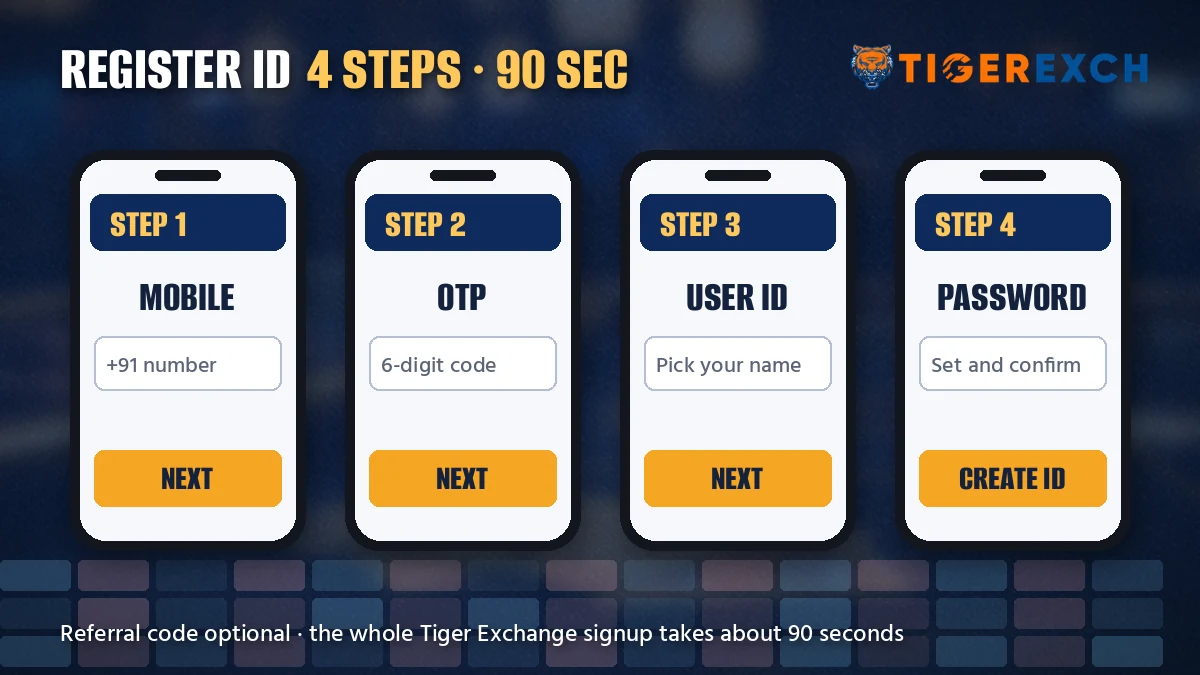
Step three looks skippable, and it is. But the choice changes how you sign in afterwards. With a user ID set, Tiger Exchange lets you log in with that ID and your password, no SMS involved. Skip it, and the mobile-plus-OTP route becomes your everyday door, which means waiting on a text every time you open the site.
A few things make a handle easier to live with. Keep it short enough to type on a phone keyboard without looking. Leave your full name and your mobile number out of it; the ID shows up in chats with the desk and screenshots people share. Mix in a couple of digits from the start, since a plain word is more likely to be taken (tigerfan on its own almost certainly is). Whether a Tiger Exchange user ID can be renamed later is something to confirm with the desk rather than count on, so treat the first pick as permanent.
There are two doors into the same kind of account. The form above is the self-serve one. The other is a message to the desk, which builds the ID for you. Rows below compare them on the points people usually ask about.
So the form wins on speed, the desk wins when the OTP will not arrive. Hard to say which is more common; on a patchy network the desk probably saves time overall. Do not run both routes for one person, though. Registering on the form and then asking the desk for an ID leaves you with two separate Tiger Exchange accounts, two balances, two logins; if the form half-worked, tell the desk you already started and let them sort out the existing one. How the desk route works, message by message, is on the Tiger Exchange ID request page.
Of the four Tiger Exchange screens, the code screen is the only one you do not fully control. Your fingers handle the rest. This one waits on a mobile network.
The code lands on whichever SIM holds that number, which is not always the device you are registering on. Plenty of people fill the form on a laptop and read the SMS off a phone lying next to it, and that works fine, as long as the phone is actually the one with the SIM. Dual-SIM handsets trip people up here more then anything else: the code went to slot two, and they are watching slot one.
Three habits that save a retry:
That is the theory. In practice a few numbers simply do not receive the text on a given day, and waiting it out is not always worth it. If two full windows pass with nothing, stop and switch to the desk route instead of burning a third.
The referral code box is the last thing on the Tigerexch register form before the button. It is optional. The form goes through with it blank.
Codes come from someone who already has a Tiger Exchange account, usually a friend or an agent who brought you in. What a particular code gives you is not printed on the form, and we are not going to guess at it here, so ask the person who shared it what it is meant to do (and keep that message, in case you need to show the desk later). If the benefit they described does not appear after you register, the Tiger Exchange WhatsApp desk is where to raise it.
Paste the code rather than typing it. A trailing space copied from a chat is probably the most common reason a valid code gets refused, and it is invisible on a phone screen.
Most accounts are opened this way. Leave the box empty, press Register, and the Tiger Exchange account is exactly as usable for deposits, the sports board and withdrawals as far as the signup form is concerned. Whether a code can be attached to an account after it is created is a question for the desk, not something to assume. If you have a code and want it counted, put it in before pressing Register, not after.
The phrase people type when they want their own username on Tiger Exchange. The ID comes out of step three of the form; skip that step and the mobile number stands in for it, with OTP sign-in instead of a password.
The four-screen process itself: mobile, OTP, optional user ID, password. Tiger Exchange registration finishes in roughly a minute and a half, asks for no document and takes no money up front.
Same action, two labels. The site button reads Register, people search for sign up just as often, and both lead to the identical Tiger Exchange form with the same OTP step.
The short brand spelling. A Tigerexch register attempt on any working address, 247 or 365 included, opens the same form, and the finished account works across all of them with one balance.
What happens the moment Register is pressed: a logged-in Tiger Exchange account with an empty wallet, ready for the cashier. Account open means usable, not verified; KYC comes later, before the first payout.
A new account can carry a referral code from an existing member, pasted into the last box before Register. A Tiger Exchange new account without one opens and plays exactly the same way.
Zero balance, already logged in, and one gap that bites later. The Tiger Exchange signup form never asked your name.
Before any money moves, three small checks. Write down the user ID exactly as the form accepted it, every underscore included. Log out once and log back in with the password, which proves the password you typed twice is the one you think it is (a surprising number of people fat-finger the confirm box identically). Then bookmark the Tiger Exchange address page, because the address you registered on may not be the one that opens next month.
None of this takes long. It just saves a support chat later, and a support chat is slower than all three checks put together.
Your name enters the picture at KYC, which happens before the first withdrawal. At that point Tiger Exchange compares it with the the bank account or UPI ID that money goes back to, and those have to match. So the order that avoids trouble looks like this:
One composite case, pieced together from the sort of thing the desk hears: someone registered in the evening, topped up through a cousin's UPI because their own app was acting up, played through the weekend, then asked to withdraw on Monday. KYC flagged the mismatch and the payout sat while it was sorted. Nothing was lost. It just took days instead of minutes.
More on deposit methods sits on the Tiger Exchange ID and deposit page; the withdrawal timing is explained where the 365 board lives, on the Tiger Exchange 365 login page.
The live board below is what a newly funded Tiger Exchange account lands on after the cashier.
Most failed Tiger Exchange signups stop at one of seven places. The fix is nearly always small.
| What you see | Likely cause | What to do |
|---|---|---|
| No SMS after Get OTP | Wrong digit, or the SIM is in another phone | Check the number, wait out the window, request once more |
| OTP refused | Code older than 5 minutes, or an earlier code typed | Request a fresh code and use only the newest SMS |
| Register does nothing | Passwords differ, or shorter than eight characters | Retype both password boxes |
| User ID refused | Probably taken already | Add a few digits, or skip the step |
| Referral code refused | Stray space or wrong code | Paste it again, or clear the box |
| Number already registered | An account exists on that mobile | Sign in and use forgot password |
| Form will not load | That address is blocked by the network | Open another Tiger Exchange address |
The last two rows deserve a word. If the mobile already has an account, a second registration is not the answer; head to the sign-in page for existing Tiger Exchange accounts and reset the password from there. And if nothing loads at all, the problem is rarely your phone.
The third row trips more people than it should. Phone keyboards like to capitalise the first letter of a box on their own, and they do not always do it in both password boxes, so the two entries look identical behind the dots and still differ. Tap the eye icon if the form shows one, or type both slowly with the caps key checked. It is a thirty-second fix that feels like a broken form.
An account made on one Tiger Exchange address is not stuck there. Indian networks block betting domains now and then, so if the Tiger Exch 247 address refuses to load for you, the 365 address shows the identical four-screen form, and the account you finish on either opens on the other with one balance. Register once, wherever loads. A second signup on a different address only gives you a second, separate account to untangle.
After two OTP windows with nothing, stop retrying. Text the Tiger Exchange desk on +91 81097 11726 (text only, it runs round the clock) and they will set the ID up for you; typical reply times and the message format are on the Tiger Exchange WhatsApp number page. Planning to play on Android? Finish registration in the browser first, then sign in on the app with the same details, because the Tiger Exchange APK download uses the same login as the site. One account, one password, its the same wallet either way.
No. The referral code box on the Tiger Exchange signup form is optional, and the Register button works with it empty. Enter a code only if a friend or agent gave you one, and paste it rather than typing it so a stray space does not get it refused.
Four screens on the Tiger Exchange register form do it in about 90 seconds. The mobile number goes first, the six-digit SMS code second, an optional user ID third, and a password typed twice last. Press Register and you are signed in straight away on a zero balance.
The signup form is quicker when the OTP arrives, roughly 90 seconds against about 12 minutes through WhatsApp. The desk route suits people whose SMS keeps failing, because the desk issues the ID and a temporary password for them. Both routes end in the same kind of Tiger Exchange account.
Eighteen. Tiger Exchange accounts are for adults only, and since the four-screen form never asks for a birth date, the check happens at KYC, when documents are reviewed ahead of the first withdrawal. Rules on real-money gaming also differ between Indian states, so your local law applies on top.
Nothing for the form itself; Tiger Exchange only needs a working mobile number at signup. Keep an identity document handy for later, though. KYC runs before the first withdrawal, and if the name there differs from the UPI or bank account you paid from, the payout waits until that is sorted.
Usually the mobile number has a wrong digit or the SIM sits in a different phone. Check the number, let the 5-minute window run out, then request one fresh code. If that fails too, text the Tiger Exchange desk on +91 81097 11726 and they can set the ID up for you.
Any handle the form accepts, something like tigerfan_07, and the step is optional. If the Tiger Exchange form refuses your choice, the name is probably taken, so add a few digits and try again. Skip the step and you can still sign in with your mobile number and an OTP.
Open the cashier inside your new Tiger Exchange account and pay by UPI, IMPS or bank transfer; the current minimum is shown on that screen. Pay from an account in your own name, since KYC before the first withdrawal compares that name with your documents.