
Tiger Exchange App — Live Board, QTech Tables and UPI Cashier on Your Phone
The Tiger Exchange app comes in two forms: an Android APK you install once, and an iPhone shortcut you pin from Safari. Both open the same board and accept the same user ID and password, so the balance on your phone is exactly the one you left on the laptop.

Tiger Exchange App Sign-In — One Real ID on Android and iPhone
No separate phone account exists. Whatever you type on the desktop site goes into the Tiger Exchange app too, and the Tiger Exchange login routes (password, OTP, demo) behave the same on a small screen. No account yet? Have one opened through the Tiger Exchange ID desk on WhatsApp before installing anything.
Tiger Exchange App Ledger — Four Live Screens a Single Tap Apart
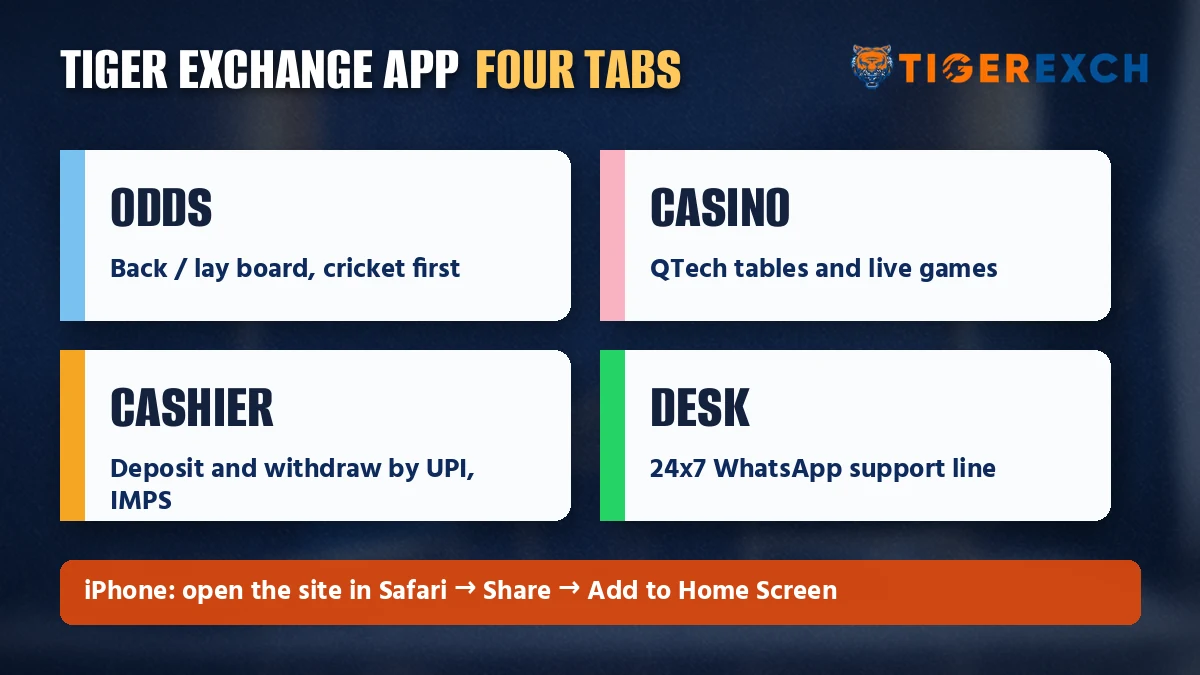
Four icons. That is roughly the whole Tiger Exchange app once you are signed in: odds, casino, cashier and the support desk, each one a single tap from wherever you happen to be on the board.
- OddsThe live back and lay board on Tiger Exchange for cricket, football, tennis and kabaddi, grouped by match.Before the toss, and every time the price moves
- CasinoCard and wheel games from QTech Games, with Aviator alongside, paid from the same Tiger Exch wallet your cricket bets use, so no transfer between sections.Between innings, or when there is no match on
- CashierMoney in through UPI, IMPS or a bank transfer. Money out goes only to a UPI ID or bank account carrying your own name, after KYC clears.Topping up before a big game, cashing out after
- DeskA WhatsApp text line that answers 24x7, with a Telegram channel beside it for notices.Anything the other three screens cannot fix
Nothing on that list is exclusive to the phone, since the desktop site carries every screen as well. What the Tiger Exchange app does is keep them closer together, which matters more than it sounds when a price can shift twice inside one over.
Tiger Exchange Cricket Betting App — Reading the Odds Screen
Cricket gets the most space. Open a Tiger Exchange match page on the phone and it splits into match odds (back and lay in two columns), a bookmaker market, and fancy lines for session runs. Below, a sample board fills itself while you are on the page.
Three small habits save most of the grief people report on a phone-sized odds screen:
- Price changed while you typed the stakeRead the new figure firstAssume the old price holds
- Fancy line for a sessionCheck which over it runs toTreat it like match odds
- Signal dropped mid-overReopen and check open betsPlace the same bet twice
Tigerexch App Download on Android, Plus the Easy iPhone Home-Screen Route
Two phones, two routes, one account. Android users take a real file; iPhone users pin the site. Either way the Tiger Exchange sign-in screen is the same one you already know.
Tiger Exchange App Download for Android
Android gets an APK that comes from the Tiger Exchange address itself rather then from an app store (roughly 31 MB, needs Android 7.0 or newer; the Tigerexch APK download page keeps file and version details). The install goes like this:
- In Chrome, load today's working Tiger Exchange address and hit the link marked for Android.
- When the file finishes, open it from the Downloads folder.
- Allow installs from unknown sources when Android asks. Once is enough.
- The Tiger Exchange icon now sits in the app drawer; tap it and your existing Tiger Exchange ID goes straight in.
Tiger Exchange iOS — Add to Home Screen from Safari
Short version for iPhone owners: skip any file that calls itself a Tiger Exchange iOS download, because none is published. Tiger Exchange on an iPhone is the live site pinned to your home screen from Safari. It gets its own icon, opens without the address bar, and in daily use it is easy to forget it is not an installed app.
- Open the current Tiger Exchange address in Safari.
- Tap the Share icon at the bottom of the screen.
- Scroll the sheet and pick Add to Home Screen, then Add.
- From then on, the Tiger Exchange shortcut on your home screen is the app. Your usual credentials work.
Safari is the dependable route here (newer iOS releases let some other browsers do the same, though the option hides in a different menu).
| Point | Android APK | iPhone shortcut |
|---|---|---|
| How you get it | Download and install a file | Pin the site from Safari |
| Storage | An installed file (size listed on the APK page) | Almost nothing; it is a link |
| Updates | Install the newer file when one is posted | Always loads the live site |
| Login | Same Tiger Exchange ID and password | Same Tiger Exchange ID and password |
| Balance | One wallet, shared | One wallet, shared |
Indian networks cut off betting domains every so often, and when one goes, Tiger Exchange publishes a replacement address. Account and wallet carry over untouched. What does not carry over is your iPhone icon: it was saved against the retired address, so remove it and save a fresh one from the working link. An installed APK normally needs nothing more than a restart.
Tiger Exchange App and Desktop in the Same Session
Nothing has to be synced by hand. Say you log in on the laptop during the first session of a Test, back one side, then leave the house: the open bet is already sitting in the Tiger Exchange app bet list, and the balance under it has moved by the stake. One account, one slip history. In practice the phone becomes a second window onto the same Tiger Exchange wallet rather than a separate thing to manage, which is also why a deposit made from the app, once credited, shows on the desktop too.
When the Tiger Exchange Mobile App Will Not Open
Most failures fall into four buckets, and the fix is short in almost every case. Work down the list in order:
- Blank or spinning screen. Usually the address is blocked on that network. Switch between Wi-Fi and mobile data, then try the current Tiger Exchange address.
- Android refuses the install. File-level causes are covered on the APK page. From the app side, check one thing first: is an old Tiger Exch icon still in the drawer? Remove it, then retry.
- iPhone icon opens an error page. The shortcut still carries a retired address. Delete the icon, open the working address in Safari, pin it again.
- Password refused. The app takes the exact desktop credentials. Reset from the login screen, or sign in with mobile OTP instead.
A typical case: somebody pins the shortcut during one series, the address changes a few weeks later, and the icon on the the home screen quietly stops working. Nothing is wrong with the account. If none of the above helps, text the WhatsApp desk on +91 81097 11726 with your user ID and a one-line description of what the screen shows.
Tiger Exchange Mobile App Search Terms Made Clear
People type Tigerexch app or Tiger Exchange app depending on habit. One product either way, one wallet, and whichever phone you hold, the login details do not change.
A Tiger Exchange app download or Tigerexch app download means the Android APK. The Tiger Exch APK file notes list size, version and the permission prompt.
Tiger Exchange iOS has no file at all. iPhone owners add the site to the home screen from Safari and get an icon that behaves like the app; if the address changes, that icon is saved again from the new link.
Tiger Exchange betting app, Tiger Exchange cricket betting app, Tiger Exchange mobile app: three phrasings, and behind them the four icons from the ledger above. Cricket match odds and fancy lines on the first, QTech tables on the second, the UPI and IMPS cashier on the third, the WhatsApp desk on the fourth.
- Same Tiger Exchange ID on Android, iPhone and desktop
- UPI, IMPS or bank transfer inside the app cashier
- WhatsApp desk answers 24x7 by text
- 18+ only, within your own limits
Quick Tiger Exchange App Answers for Android and iPhone Players
- What is the difference between the Tiger Exchange app and the APK?
There is no real difference on Android: the APK is the file that installs the Tiger Exchange app. On iPhone the app is a Safari home-screen shortcut instead of a file. Both versions use the same login, the same odds board and the same wallet, so switching between them costs nothing.
- Is there a Tiger Exchange iOS app for iPhone?
Not as a download. iPhones cannot install APK files, so Tiger Exchange on iOS works through Safari: open the current address, tap Share, choose Add to Home Screen. The icon then opens the live site full-screen, and you sign in with your usual Tiger Exchange ID.
- Why is the Tiger Exchange app not opening?
Usually one of two things: your network is blocking the address, or the icon was saved against an address Tiger Exchange has since retired. Toggle between Wi-Fi and mobile data first. Then load the current address, and on iPhone save the icon again. Android users should uninstall any older copy before reinstalling.
- How much mobile data does the Tiger Exchange app use?
Tiger Exchange does not publish a fixed figure, because use depends on what you open. Menus, the cashier and a settled bet list are light. An in-play match page refreshes odds constantly, and casino tables load more graphics, so a long session on either draws noticeably more data.
- tiger exchange app
- tigerexch app download
- tiger exchange app download apk
- tiger exchange ios app
- tiger exchange mobile app login
- tiger exchange cricket betting app
- tiger exchange app kaise download kare
- tigerexch app for iphone